
Side navigation
#8049 closed bug (fixed)
Opened January 25, 2011 11:34AM UTC
Closed March 11, 2012 11:42AM UTC
problem in home page of jQuery
| Reported by: | anonymous | Owned by: | jdsharp |
|---|---|---|---|
| Priority: | low | Milestone: | |
| Component: | web | Version: | |
| Keywords: | Cc: | jdsharp | |
| Blocked by: | Blocking: |
Description
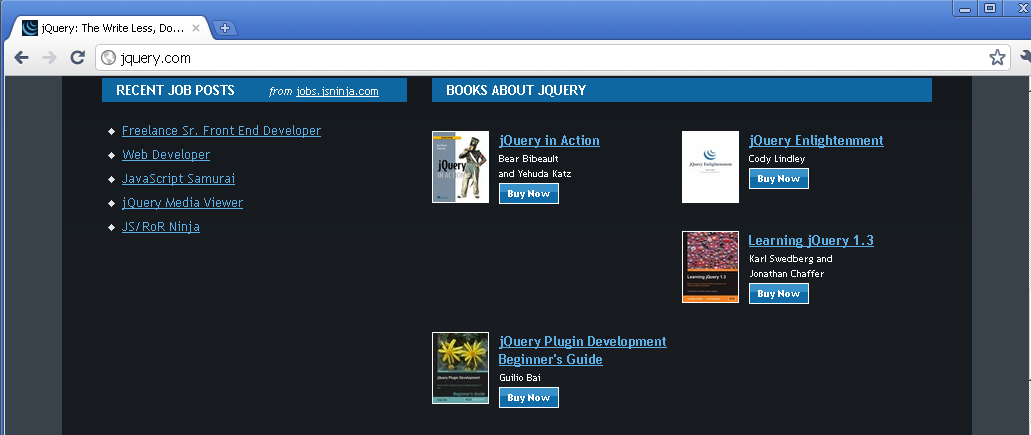
i found that book list not looking good in current version of Firefox and chrome.
check the link and see the book list in bottom.
Attachments (0)
Change History (6)
Changed January 25, 2011 04:57PM UTC by comment:1
| component: | unfiled → web |
|---|---|
| priority: | undecided → low |
| status: | new → open |
Changed January 27, 2011 04:24PM UTC by comment:2
| owner: | → jdsharp |
|---|---|
| status: | open → assigned |
Hey Addy,
Could you point out what the specific issue is? I'm not noticing anything.
Cheers,
- Jonathan
Changed January 28, 2011 01:02PM UTC by comment:3
| milestone: | 1.next |
|---|---|
| version: | 1.4.4 |
Changed January 29, 2011 06:30AM UTC by comment:4
| cc: | → jdsharp |
|---|
Hey JD,
If you look at the current homepage in latest Chrome (at least on OSX) you'll notice that one of the books on the left hand side of the screen looks out of place.
Let me know if you need a screenshot, but its definitely still there.
Cheers
Addy
Changed February 01, 2011 08:55AM UTC by comment:5
Chrome/Safari in OSX is fine for me, but in windows is messed up: http://gyazo.com/6e94ccb247718687dd50c4029268cc1b.png - looks like a problem with jq-clearfix
Changed March 11, 2012 11:42AM UTC by comment:6
| resolution: | → fixed |
|---|---|
| status: | assigned → closed |
The jq-clearfix issue on the book list has since been updated and this entire section has been redone for the upcoming site refreshes. Closing.
Confirmed in latest Chrome. It's a minor issue that should be quick to fix.